Full disclosure: Rewritly is our product. Details about Gmail come from Google's help center, checked on November 3, 2026.
How Gmail's grammar check works
As you type, Gmail checks your text and underlines words or phrases that need corrections.
- To see a suggestion: click the underlined text.
- To accept it: click the suggestion.
- To dismiss it: click Ignore.
Gmail also corrects commonly misspelled words automatically. To undo that, press Ctrl + Z on Windows or Cmd + Z on a Mac.
How to turn Gmail's grammar check on or off
- On your computer, open Gmail.
- At the top right, click Settings, then See all settings.
- At the top, click General.
- Turn Grammar suggestions on or off. You can change Spelling suggestions and auto-correct here too.
If Gmail's grammar check isn't working
Try these in order. The language note comes from Google, and the rest are general troubleshooting:
- Check the setting. Make sure Grammar suggestions is on, using the steps above.
- Check the language. Google says spelling and grammar checks may not be available in all languages.
- Save your settings. If you changed something on the settings page, scroll down and save it, then reload Gmail.
- Test with a clear mistake. Type "she don't know" in a new draft.
- Try without extensions. Another writing extension could interfere, so try a private window or turn it off for a moment.
What Gmail's grammar check doesn't do
Suggestions fix words and phrases one at a time. If you want to shorten a whole message, change its tone or translate it, here are your options:
- Gemini in Gmail: Google offers this on eligible Google Workspace and Google AI plans.
- A chatbot: this works, but you copy your draft out and paste the result back.
- A desktop writing tool: Rewritly works inside the Gmail compose box on Mac and Windows, as well as in Outlook, Apple Mail and other apps.
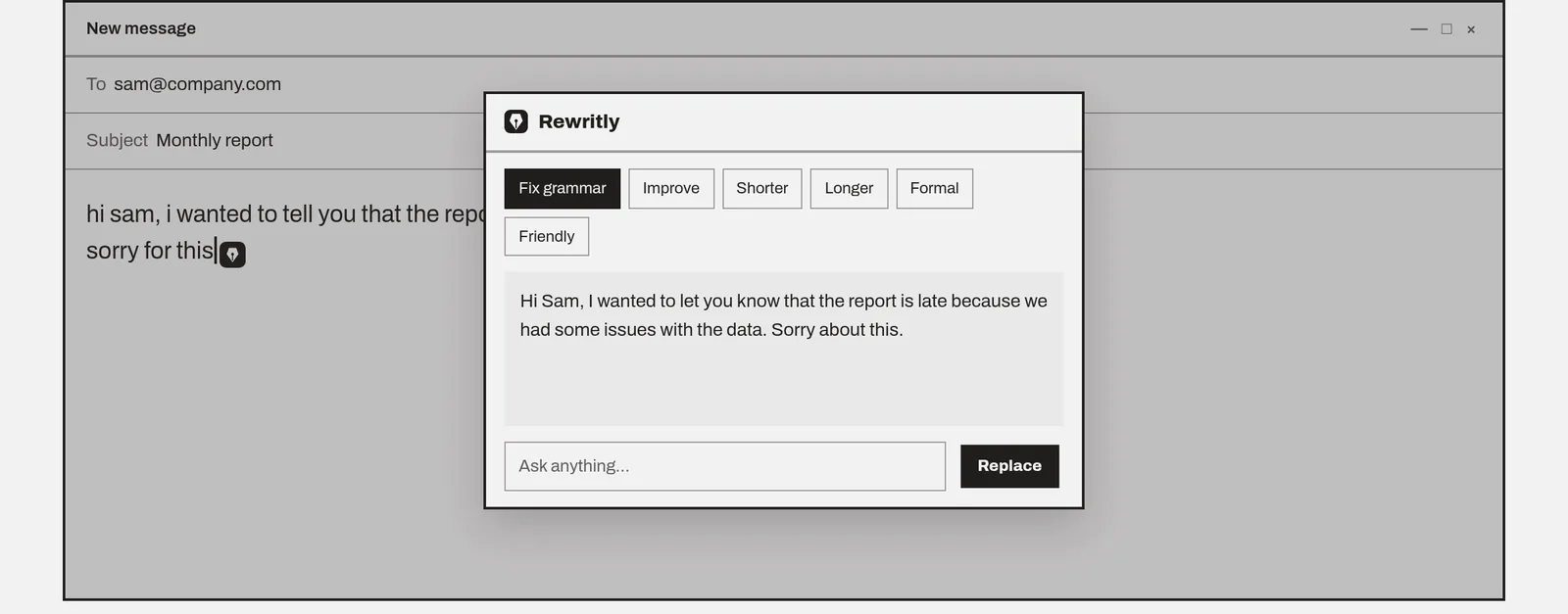
With Rewritly, click the icon next to your cursor or press the shortcut, pick Fix grammar, Formal, Friendly or Shorter, then press Replace. Here's an example, written for this guide:
- Before: "hi sam, i wanted to tell you that the report is late cause we had some issues with the data, sorry for this"
- After: "Hi Sam, I wanted to let you know that the report is late because we had some issues with the data. Sorry about this."
For more ways to improve a draft, see how to make an email sound professional.
Rewrite your next email in Gmail
The free plan gives you 10 rewrites a day, and no card is needed.
Free plan, no card needed · macOS 11+ · Windows 10/11 · On a phone? Email yourself the link
Source (checked 3 Nov 2026): Gmail Help: Check spelling and grammar in Gmail
FAQ
Does Gmail have a grammar check?
Yes. Google says Gmail checks your text automatically as you type and underlines words or phrases that need corrections. Click the underlined text to see the suggestion.
How do I turn on grammar check in Gmail?
On a computer, open Gmail, click Settings at the top right, then See all settings. On the General tab, turn Grammar suggestions on. The same page has Spelling suggestions and auto-correct.
Why is Gmail grammar check not working?
First confirm Grammar suggestions is on in Settings. Google also says the checks may not be available in all languages, so a message in another language may not get suggestions.
How do I undo a Gmail auto-correction?
Press Ctrl + Z on Windows or Cmd + Z on a Mac straight after the change.
Can Gmail rewrite my email?
Google says you can use Gemini in Gmail to improve your writing if you have an eligible Google Workspace or Google AI plan. Other options include a chatbot, or a writing tool such as Rewritly on Mac and Windows.