Full disclosure: Rewritly is our product and is mentioned near the end. The tips and examples work with or without it. All examples were written for this guide.
5 steps to make an email sound professional
- Put the point first. Readers should know what you want after one sentence. Start with the request or the news, then add the background.
- Cut the filler. "I just wanted to reach out to let you know that" can usually become "The report will be late".
- Replace casual words. Change "hey" to "Hi Sam", "asap" to a real date, and "stuff" to what you actually mean.
- Make requests specific. Say what you need, who should do it and by when. "Could you send the invoice by Friday?" is easier to answer than "Please look into this".
- Check it before you send. Fix grammar, names and dates, and confirm any attachment you mentioned is really attached.
Before and after examples
Telling your manager something is late
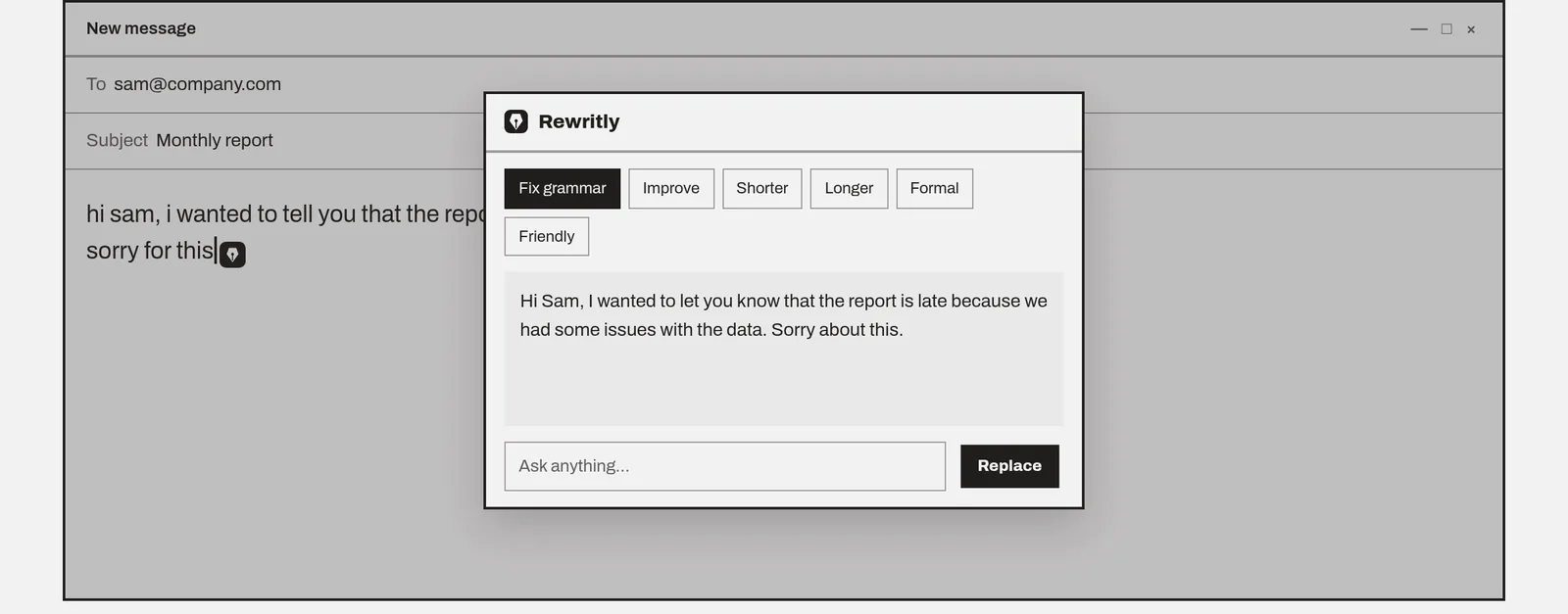
- Before: "hi sam, i wanted to tell you that the report is late cause we had some issues with the data, sorry for this"
- After: "Hi Sam, the report will be late because we found a problem with the data. I expect to send it by Thursday. Sorry for the delay."
The second version also gives a date, which is the first thing Sam would ask.
Chasing a reply
- Before: "Hi, any update on this?? I'm still waiting"
- After: "Hi Priya, do you have an update on the contract? I'd like to confirm by Friday so we can start on Monday."
Asking for time off
- Before: "Hey, I need next Friday off for some personal stuff, hope thats ok"
- After: "Hi Maria, may I take next Friday, June 12, off for a personal matter? I'll finish the client summary before then."
Saying no politely
- Before: "Sorry but we can't do that, we're too busy right now."
- After: "Thanks for asking. We can't take this on this month, but we could start in early July if that works for you."
Replying to a complaint
- Before: "That wasn't our fault. The courier messed up your order."
- After: "I'm sorry your order arrived late. The courier had a delay, and I've asked for an update. I'll email you by 3 p.m. with a new delivery date."
20 phrases to swap
| Instead of | Try |
|---|---|
| Hey! | Hi Sam, |
| ASAP | By Friday at noon |
| As per my last email | As I mentioned on Monday |
| I just wanted to check | Could you confirm |
| My bad | I'm sorry, that was my mistake |
| No problem | Happy to help |
| Let me know | Please let me know by Tuesday |
| Sorry for the late reply | Thanks for your patience |
| Just following up | I'm following up on the proposal I sent on May 3 |
| Did you get my email? | I wanted to make sure my email from Tuesday reached you |
| I need this now | Could you send this by 4 p.m. today? |
| That's not my job | That's outside my area, but Alex can help with this |
| I don't know | I'll find out and get back to you by Thursday |
| You're wrong | I see it differently. Here's what I found |
| Can you do me a favor? | Would you be able to help with |
| Thanks in advance | Thank you for your help with this |
| Per our conversation | Following our call today |
| FYI | For your information, or just state the update |
| Cheers / Thx | Thanks, / Best regards, |
| Hope you're well!!! | I hope you're well. |
A simple professional email template
Most work emails fit this shape. Fill in the brackets and delete what you don't need.
Subject: [Topic]: [what you need or what changed]
Hi [Name],
[One sentence with the request or the news.]
[One to three sentences of background, or a short list.]
Could you [specific action] by [day and time]?
Thank you,
[Your name]
For example: "Subject: Invoice 2041: payment date? / Hi Tom, could you confirm when invoice 2041 will be paid? It was due on May 30, and our system still shows it as open. Could you let me know by Friday? Thank you, Ana."
Copy-paste AI prompts
If you use ChatGPT, Gemini, Claude or another chatbot, paste one of these above your draft. Each one tells the AI what to keep, which stops it from padding your email or changing what you said.
- General: "Rewrite this email to sound professional, polite and concise. Keep my meaning, keep it about the same length, and don't add facts or promises."
- To a manager: "Make this email professional and clear for my manager. Put the main point first and keep it under 100 words."
- To a client: "Rewrite this email for a client. Make it warm but professional, and end with a clear next step."
- Polite but firm: "Make this email polite but firm. Keep the deadline and the request exactly as they are."
- Softer tone: "This email sounds too blunt. Make it friendlier and more professional without changing what I'm asking for."
- Shorter: "Cut this email to the essentials. Keep the request, the date and the thank-you."
Always read the result before sending. Check names, dates, numbers and anything the AI added.
Mistakes that make emails sound less professional
- Sounding stiff. "Pursuant to our discussion, kindly revert" is harder to read than "Following our call, please reply by Friday."
- Over-apologizing. One clear apology is enough. Then say what you'll do next.
- Vague subject lines. "Quick question" tells the reader little. "Invoice 2041: payment date?" tells them what it's about.
- Writing while annoyed. If you're frustrated, save a draft and read it again later.
Using AI to make an email sound professional
If you use a chatbot, give it the context: "Make this email more professional and keep it short. It's to a client whose order is late." Then read the result carefully. AI can change your meaning, add promises you didn't make or sound unlike you.
Copying text between your email and a chatbot takes time, so a tool that works in your email window can help. With Rewritly on Mac or Windows:
- Write your draft in Gmail, Outlook or Apple Mail.
- Click the icon next to your cursor, or press the shortcut.
- Pick Formal, Shorter or Fix grammar, or ask for something specific, such as "make this polite but firm".
- Read it, then press Replace.
Rewritly needs an internet connection. It only sends text when you ask it for help.
Try it on your next email
The free plan gives you 10 rewrites a day, and no card is needed. Pro is unlimited for $7 a month, $19 for 3 months or $59 a year.
Free plan, no card needed · macOS 11+ · Windows 10/11 · On a phone? Email yourself the link
FAQ
How do I make an email sound more professional?
Put your main point first, remove filler, swap casual words for plain and polite ones, make requests specific, and proofread. Short, clear emails usually sound more professional than long, formal ones.
What should I avoid in a professional email?
Avoid slang, text abbreviations, all capitals, several exclamation marks, vague requests and long apologies. Also avoid phrases that sound annoyed, such as "as per my last email".
Can AI make my email sound professional?
Yes. You can ask an AI tool to make a draft more professional, but read the result before sending. Check names, dates and promises, and make sure it still sounds like you.
How long should a professional email be?
As short as it can be while still giving the reader what they need. If an email covers several topics or needs a long explanation, use short paragraphs or a list so it's easy to scan.
What is a good AI prompt to make an email sound professional?
Try: "Rewrite this email to sound professional, polite and concise. Keep my meaning, keep it about the same length, and don't add facts or promises." Then add who it's for, such as a client or your manager, and read the result before sending.
What's a professional way to say "as per my last email"?
Try "As I mentioned on Monday" or "To recap what I shared earlier", followed by the key point again. It gives the reader the information without sounding annoyed.
How do I sound professional but still friendly?
Keep a warm greeting and a thank-you, and write in plain language. Friendly doesn't mean casual: "Thanks for your help with this" is both friendly and professional.