Full disclosure: Rewritly is our product. Details about Wispr Flow and Grammarly come from their own pages, checked on November 25, 2026. Prices are in US dollars, per person, and can differ in your country.
What Wispr Flow and Grammarly each do
- Wispr Flow is for speaking. You hold a key, talk, and it writes your words into the app you're using. Wispr Flow says it removes filler words, adds punctuation and formats your writing. It runs on Mac, Windows, iPhone and Android. On Pro, Command Mode and Transforms can also rewrite text you select, from a spoken instruction.
- Grammarly is for typing. It checks spelling, grammar and tone as you write, and Pro rewrites full sentences with a click. Grammarly's Pro plan also lists plagiarism and AI-text detection. On phones, Grammarly now has speech to text too: in the Grammarly Keyboard on iPhone, and through the Grammarly widget on Android.
So people who use both usually speak with one and polish with the other. That's two subscriptions.
What both cost together
| Plan | Billed monthly | Billed yearly |
|---|---|---|
| Wispr Flow Pro | $15 a month | $144 a year ($12 a month) |
| Grammarly Pro | $30 a month | $144 a year ($12 a month) |
| Both together | $45 a month ($540 a year) | $288 a year |
| Rewritly Pro (voice typing and rewrites) | $9.90 a month | $79.90 a year (about $6.66 a month) |
On yearly billing, one Rewritly plan is $208.10 a year less than the two Pro plans together. On monthly billing it's $35.10 a month less. Rewritly also has a 3-month plan at $24.90.
The free plans
- Wispr Flow Basic: free, with a weekly word limit. Wispr Flow's home page puts it at 2,000 words a week.
- Grammarly Free: spelling and grammar as you type, tone detection, and 100 AI prompts a month.
- Rewritly Free: 10 rewrites or voice notes a day, every feature, no card needed.
One app for voice typing and rewriting
Rewritly is a small app for Mac and Windows that does both jobs in almost any app: Gmail, Outlook, Slack, WhatsApp, Teams, Notion, Word and websites.
- Speak: hold fn on a Mac, or Ctrl + Win on Windows, and talk. Let go, and clean text appears where your cursor is, without the "um"s and repeated words. For longer notes, press fn + Space or Ctrl + Win + Space and talk hands-free.
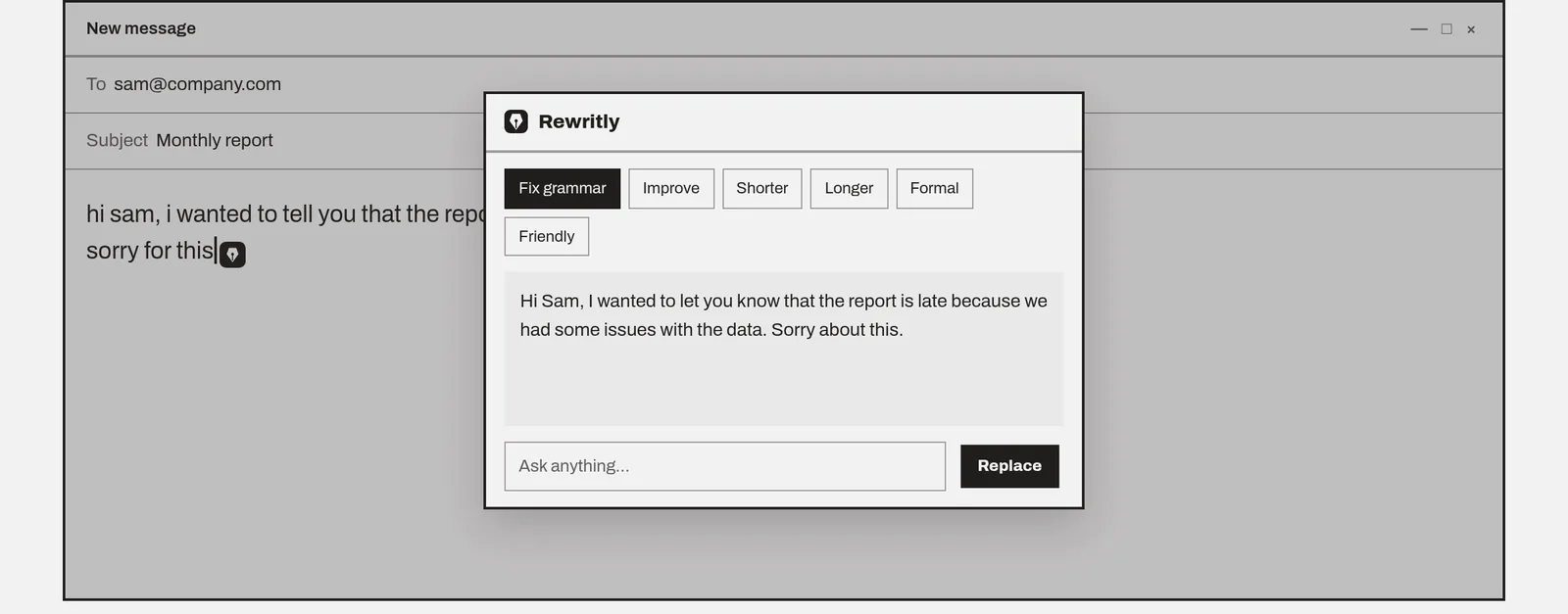
- Fix or rewrite: click the Rewritly icon next to your cursor, or press Cmd + Shift + Space (Ctrl + Shift + Space on Windows). Pick Fix grammar, Improve, Shorter, Longer, Formal or Friendly, or ask anything, such as "translate to Spanish". Press Replace.
You can do both on the same message: say your draft, then make it more formal before you send it. How voice typing works, step by step, is on the voice typing page.
What you give up with one app
Rewritly costs less, but it doesn't do everything the two apps do. Before you cancel anything, check these:
- No checking as you type. Rewritly fixes text when you ask. Grammarly underlines mistakes while you write.
- No plagiarism or AI-text check. Grammarly Pro lists both.
- Voice typing only on Mac and Windows. Wispr Flow also runs on iPhone and Android, and Grammarly has speech to text on both phones.
- A daily voice limit. Rewritly Pro includes up to 60 minutes of speech a day, and each voice note can be up to 5 minutes long. Wispr Flow Pro lists unlimited dictation.
- No team features. Wispr Flow Pro lists a shared dictionary and team workspace, and both have plans for companies.
- Internet needed. Rewritly writes down your speech on its server, so it doesn't work offline.
Which should you choose?
- Keep Grammarly if you want mistakes flagged as you type, or you check long documents, plagiarism or AI text.
- Keep Wispr Flow if you dictate on your phone, talk for hours a day, or need team features.
- Use one app if you work on a Mac or Windows PC, write mostly emails and messages, and want to speak your drafts and fix or rewrite them on request, for less than either Pro plan.
Try voice typing and rewrites in one app
The free plan gives you 10 rewrites or voice notes a day, and no card is needed.
Free plan, no card needed · macOS 11+ · Windows 10/11 · On a phone? Email yourself the link
Sources (checked 25 Nov 2026): Wispr Flow pricing · Wispr Flow home page (free plan words, platforms) · Wispr Flow docs: Command Mode · Wispr Flow docs: Transforms · Grammarly plans · Grammarly support: Pro plan prices · Grammarly blog: speech to text · Grammarly support: speech to text on Android · Rewritly pricing
FAQ
Is Wispr Flow better than Grammarly?
They do different jobs. Wispr Flow is a voice tool: you speak and it writes clean text in any app. Grammarly checks spelling, grammar and tone as you type, and its Pro plan rewrites full sentences. Which is better depends on whether you mostly speak or type.
Does Grammarly have voice to text?
Yes, on phones. Grammarly's blog describes speech to text in the Grammarly Keyboard for iPhone (updated June 15, 2026), and its help center has an article on speech to text on Android. We didn't find it described for Grammarly's Mac or Windows apps on November 25, 2026, so check Grammarly's own pages.
Does Wispr Flow correct grammar?
Wispr Flow says it removes filler words, adds punctuation and formats your writing as you speak. On Pro, its Command Mode and Transforms can also rewrite selected text from a spoken instruction, such as "make this more formal".
How much does Wispr Flow cost?
Wispr Flow's pricing page lists Pro at $15 per user a month, or $12 per user a month billed yearly ($144 a year). Its free Basic plan has a weekly word limit, which its home page puts at 2,000 words a week. Students get 50% off.
How much do Wispr Flow and Grammarly cost together?
In US dollars, $45 a month on monthly billing ($15 for Wispr Flow Pro plus $30 for Grammarly Pro), or $288 a year on yearly billing ($144 each). Prices can vary by country.
Is there a cheaper alternative to Wispr Flow?
Rewritly Pro costs $9.90 a month or $79.90 a year and includes voice typing on Mac and Windows, up to 60 minutes of speech a day, plus unlimited rewrites. Wispr Flow Pro has unlimited dictation and also runs on iPhone and Android, so compare what you need.
Do I need both Wispr Flow and Grammarly?
Not always. If you want mistakes underlined as you type, Grammarly does that. If you want to speak instead of type, Wispr Flow or Rewritly does that. If you speak your drafts and only need a fix or rewrite when you ask, one app can cover both.