Full disclosure: Rewritly is our product. Details about Microsoft Editor and the other tools come from their own pages, listed at the end of this post. Plans change, so check before you rely on them.
What happened to Microsoft Editor?
Microsoft's support page says the Microsoft Editor browser extensions for Edge and Chrome were retired on October 31, 2025. They no longer receive updates or support. If the Editor icon disappeared from Chrome, or suggestions stopped showing, this is why.
Microsoft says the writing help from the extension is now built into Edge's own proofing tools. It doesn't name a replacement for Chrome or Firefox.
Where Microsoft Editor still works
- Edge: Editor is built in and works in text boxes where a website doesn't run its own spell check. In Edge settings, under Languages, Writing assistance has a Basic option, which Microsoft says only does local spell checking on your device.
- Word: Word for the web gives basic spelling and grammar checks with a free Microsoft account. Word for Microsoft 365 has Editor on the Home tab.
- Outlook: Editor checks spelling, grammar and style in Outlook. See how to check grammar in Outlook for the steps in new Outlook, classic Outlook and Outlook on the web.
Microsoft says the free service covers basic grammar and spelling. Suggestions for clarity, conciseness, formality and vocabulary need a Microsoft 365 subscription.
5 alternatives compared
| Tool | What's free | Where it works | Best for |
|---|---|---|---|
| Edge's built-in proofing | Basic spelling and grammar | Edge only | People happy to switch to Edge |
| Grammarly Free | Spelling, grammar, tone detection, 100 AI prompts a month | Browser extensions, Grammarly for Windows and Mac | Suggestions underlined as you type |
| LanguageTool Basic | 2,000 characters per text field, 3 AI rephrasings a day | Web editor; extensions and a Windows app listed | Writing in several languages |
| Rewritly | 10 rewrites a day, every feature, no card | Almost any app or website on Windows 10 and 11 and Mac | Fixing or rewriting whole emails and messages |
| QuillBot Free | Paraphrase up to 125 words, basic grammar fixes | Website and extensions | Paraphrasing short passages |
1. Edge's built-in proofing: the official replacement
If you already use Edge, you may not need anything else. It's the replacement Microsoft points to, and it costs nothing. The catch is that it only works inside Edge. It won't follow you into Chrome, Outlook for Windows, Teams or WhatsApp Desktop.
2. Grammarly Free: closest to the old extension
Grammarly underlines mistakes as you type, much like Editor did. Its free plan covers spelling, grammar, tone detection and 100 AI prompts a month. Full-sentence rewrites and tone changes are listed under Pro.
Grammarly also has a desktop app, Grammarly for Windows, which works in desktop apps as well as the browser. Grammarly is retiring its old Microsoft Office add-in and recommends the desktop app instead. See Rewritly vs Grammarly.
3. LanguageTool Basic: for several languages
LanguageTool checks text in many languages, which suits people who used Editor in more than one. Its free Basic plan has a limit of 2,000 characters per text field and 3 AI rephrasings a day. Check what Basic includes in the extension before you rely on it. See Rewritly vs LanguageTool.
4. Rewritly: for Windows apps, not just the browser
A browser extension can't reach desktop apps. That matters if most of your writing happens in the Outlook app, Teams, WhatsApp Desktop, Slack or Word. Rewritly is a small app, about 5 MB, that works in almost any Windows app or website.
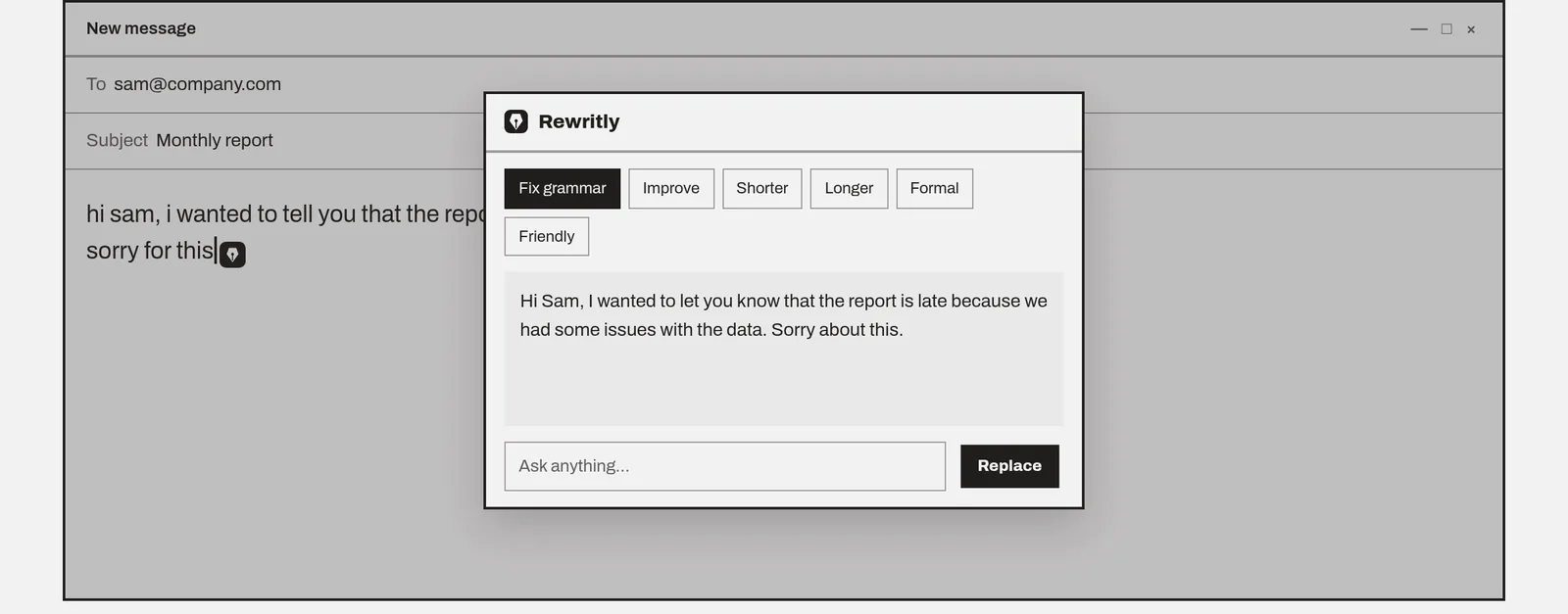
It doesn't underline as you type. You ask for help when your message is ready:
- Type in any app.
- Click the icon next to your cursor, or press Ctrl + Shift + Space.
- Pick Fix grammar, Improve, Shorter, Longer, Formal or Friendly, or ask for something such as "make this polite but firm".
- Press Replace, and the new text goes back in the same box.
To fix text without opening anything, select it and press Win + Shift + G. Rewritly fixes the grammar right there, and Ctrl + Z undoes it.
The free plan gives you 10 rewrites a day with every feature, and no card is needed. It needs an internet connection.
5. QuillBot Free: for paraphrasing
QuillBot is mainly a paraphrasing tool, with basic grammar fixes on the free plan. It paraphrases up to 125 words at a time for free. It's useful for study, but it isn't a direct Editor replacement. See Rewritly vs QuillBot.
Which one should you choose?
- You're fine using Edge: stay with Edge's built-in proofing.
- You use Chrome and want mistakes underlined as you type: Grammarly Free.
- You write in several languages: LanguageTool.
- Most of your writing is in Windows apps, and you want whole messages fixed or rewritten: Rewritly.
- You mainly paraphrase for study: QuillBot.
Running two checkers in the same text box can put two sets of icons on top of each other, so pick one for each place you write.
Try Rewritly on Windows
The free plan gives you 10 rewrites a day, and no card is needed.
Free plan, no card needed · macOS 11+ · Windows 10/11 · On a phone? Email yourself the link
Sources (checked 18 Nov 2026): Microsoft Editor browser extension retirement · Microsoft Editor checks grammar and more · Grammarly for Microsoft Office · Grammarly for Windows user guide. Grammarly plans, LanguageTool Premium and QuillBot Premium, checked 30 Oct 2026.
FAQ
Is Microsoft Editor discontinued?
The Microsoft Editor browser extensions for Edge and Chrome were retired on October 31, 2025, and no longer receive updates or support. Editor itself is still part of Edge, Word and Outlook.
Is Microsoft Editor still free?
Microsoft says the free service covers the basics of grammar and spelling. Clarity, conciseness, formality and vocabulary suggestions need a Microsoft 365 subscription.
Why did Microsoft Editor stop working in Chrome?
The Chrome extension was retired on October 31, 2025. Microsoft says its writing help is now built into Edge's proofing tools, and it doesn't name a replacement for Chrome.
What is the best free alternative to Microsoft Editor?
In Chrome, Grammarly Free and LanguageTool are the closest match. For Windows apps outside the browser, such as Outlook, Teams or WhatsApp Desktop, use a desktop app such as Grammarly for Windows or Rewritly, which has 10 free rewrites a day.
Does Word still have Microsoft Editor?
Yes. Microsoft says Word for the web gives basic spelling and grammar checks with a free Microsoft account, and Word for Microsoft 365 has Editor on the Home tab.