Full disclosure: Rewritly is our product. Details about Outlook and Grammarly come from Microsoft's and Grammarly's own pages, checked on November 18, 2026.
Which Outlook do you have?
The steps depend on your version:
- New Outlook for Windows: the New Outlook switch at the top right is on, and the app looks like Outlook on the web.
- Classic Outlook: the older Windows app. It may show a Try the new Outlook switch instead. It's part of Microsoft 365 or comes as Outlook 2016, 2019, 2021 or 2024.
- Outlook on the web: Outlook.com or Outlook for work in your browser.
Grammar check in new Outlook for Windows
- Open a new email or a reply.
- On the Message tab, in the Proofing group, select Editor, then Open Editor.
- Go through the suggestions. Mistakes are also underlined in red in the message.
To change Editor's settings, select the More options (...) menu, then Editor and Editor Settings. There you can turn checks on or off, reset them, or select Manage spellcheck languages. Microsoft says a language you pick while writing only applies to that draft.
Grammar check in classic Outlook
Outlook for Microsoft 365: select Editor on the ribbon, or the More options (...) menu on the simplified ribbon, and work through the Editor pane.
Outlook 2016, 2019, 2021 and 2024:
- In your draft, select Review, then Spelling & Grammar.
- To check every email automatically, go to File, Options, Mail. Under Compose messages, select Always check spelling before sending.
Grammar check in Outlook on the web
In your draft, go to the Message tab and, in the Options group, select Editor. Editor's settings are under Editor, then Editor Settings.
What's free, and what needs Microsoft 365
Microsoft says the free service covers basic spelling and grammar. Suggestions for clarity, conciseness, formality and vocabulary need a Microsoft 365 subscription.
Editor works on a word or a sentence at a time. It won't turn a rushed reply into a polite one, or cut a long email in half.
Grammarly not working in new Outlook?
Grammarly says it's retiring Grammarly for Microsoft Office, its add-in, and that the add-in won't get updates or support. It recommends Grammarly for Windows, its desktop app, which works across apps on Windows 10 and 11.
If Grammarly disappeared when you switched to new Outlook:
- Install Grammarly for Windows from Grammarly's website and sign in.
- Restart Outlook, open a draft and start typing.
- If you still have the old Grammarly for Microsoft Office add-in, you can remove it, since it no longer gets updates.
How to rewrite a whole email in Outlook
Grammar check fixes mistakes. Most of the time, though, the hard part is the tone: too blunt, too long, or too casual for a client. A writing assistant that works inside Outlook can rewrite the whole draft in one step.
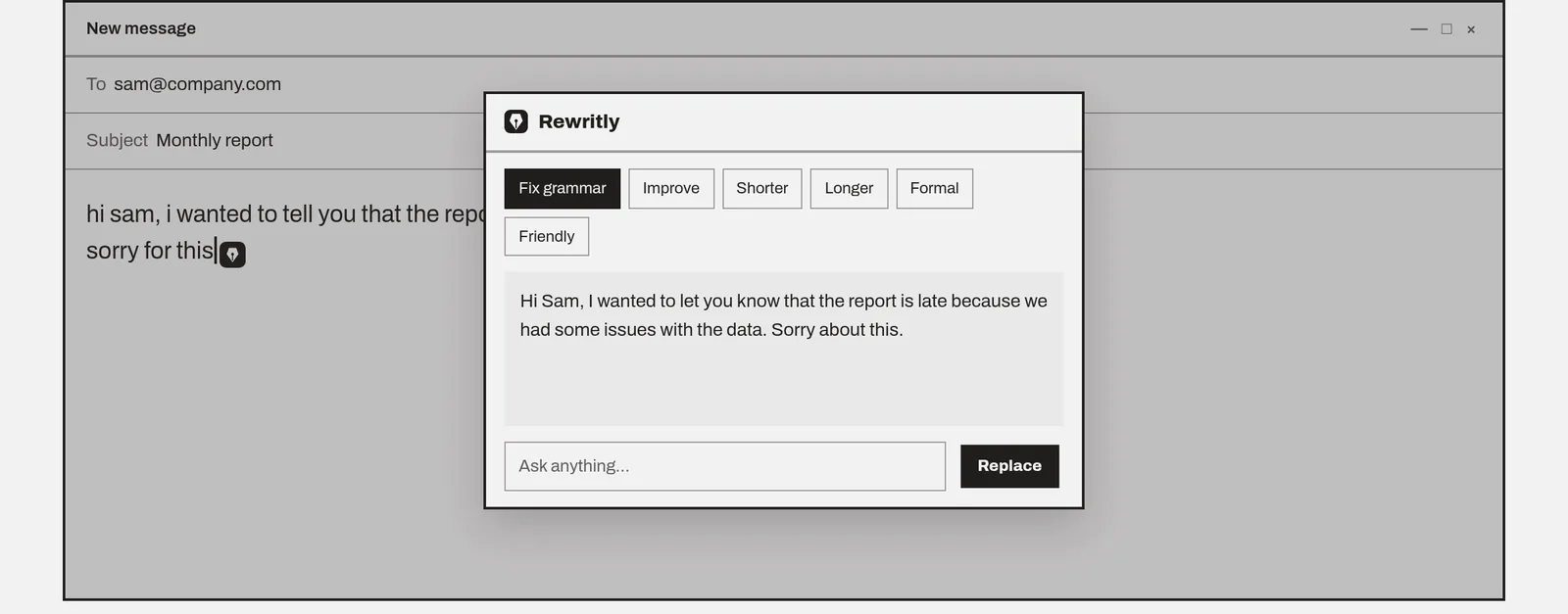
With Rewritly, in new or classic Outlook:
- Write your email.
- Click the icon next to your cursor, or press Ctrl + Shift + Space.
- Pick Fix grammar, Formal, Friendly or Shorter, or ask for something such as "make this polite but firm".
- Press Replace. The new text goes into your email with its formatting, so bullet points and bold text stay.
To only fix grammar, select the text and press Win + Shift + G. Rewritly fixes it in place without opening, and Ctrl + Z undoes it.
Rewritly only sends text when you ask for help. Check your company's policy before using a third-party writing tool for work email. If your work account includes Copilot, Microsoft says you can select text, click the Copilot button and ask it to change the selection.
Example fixes
These examples were written for this guide.
Fix grammar
- Before: "Hi Tom, i have attach the report you asked, let me know if their is any issue."
- After: "Hi Tom, I have attached the report you asked for. Let me know if there are any issues."
Formal
- Before: "Can you send the invoice today? We needed it yesterday."
- After: "Could you please send the invoice today? We need it urgently, as it was due yesterday."
Shorter
- Before: "I just wanted to quickly follow up on my previous email to see if you had a chance to look at the proposal that I sent over last week."
- After: "Following up on last week's proposal. Have you had a chance to look at it?"
Try Rewritly in Outlook
The free plan gives you 10 rewrites a day, and no card is needed.
Free plan, no card needed · macOS 11+ · Windows 10/11 · On a phone? Email yourself the link
Sources (checked 18 Nov 2026): Microsoft Support: How to spell check before sending emails in Outlook · Microsoft Editor checks grammar and more · Draft an email with Copilot in Outlook · Grammarly for Microsoft Office
FAQ
Does Outlook check grammar?
Yes. Outlook uses Microsoft Editor, which Microsoft says sorts issues into spelling, grammar and style. Advanced suggestions for clarity, conciseness and formality need a Microsoft 365 subscription.
How do I check grammar in new Outlook?
In your draft, go to the Message tab and, in the Proofing group, select Editor, then Open Editor. Suggestions are underlined in red in the message body.
How do I make Outlook check spelling before sending?
In classic Outlook 2016 to 2024, go to File, Options, Mail, and under Compose messages select Always check spelling before sending. Microsoft's steps for new Outlook don't include this setting.
Why is Grammarly not working in new Outlook?
Grammarly is retiring its Microsoft Office add-in and recommends its desktop app, Grammarly for Windows, instead. If Grammarly stopped showing after you switched to new Outlook, install the desktop app rather than the add-in.
How do I rewrite an email in Outlook to sound more professional?
Editor fixes mistakes but doesn't rewrite the whole email. Use a writing assistant that works in Outlook, such as Rewritly: select Formal, then press Replace. If your work account has Copilot, you can also select text and ask Copilot to change it.