Full disclosure: Rewritly is our product. Details about Grammarly and Discord come from their own support pages, checked on November 15, 2026.
What Grammarly and Discord say
| Where you use Discord | What to use |
|---|---|
| Discord app on Windows or Mac | Grammarly for Windows or Mac. Grammarly's support article on other apps names Discord in its title |
| Discord in your browser | Grammarly's browser extension. Grammarly says it works across a wide array of websites, so test it |
| Discord on your phone | The Grammarly keyboard, switched on in place of your usual keyboard |
| A Discord bot or plugin | Not mentioned on Grammarly's support page |
How to use Grammarly in the Discord app
- Download Grammarly for Windows or Grammarly for Mac, install it and sign in.
- Give it the permissions it asks for.
- Open Discord and type a message with a clear mistake, such as "me and him was waiting".
- Check that a suggestion appears before you rely on it.
How to use Grammarly in Discord in your browser
If you use Discord in Chrome, Edge, Safari or Firefox, install Grammarly's browser extension, sign in, and open Discord in a tab. Type a test message the same way. If you also have the desktop app installed, you don't need the extension for the Discord app itself.
How to use Grammarly in Discord on your phone
On a phone, Grammarly works as a keyboard:
- Install the Grammarly keyboard from the App Store or Google Play and sign in.
- Turn it on. On iPhone, go to Settings, General, Keyboard, Keyboards, then Add New Keyboard and choose Grammarly. On Android, follow the app's steps to enable it and set it as your keyboard.
- Open a Discord channel or DM, switch to the Grammarly keyboard, and type. Suggestions appear above the keys.
What about Grammarly bots and plugins?
Searches for a "Grammarly Discord bot" or "Grammarly plugin" are common, but Grammarly's support page points to the desktop app, not a bot. Bots that carry Grammarly's name on bot-listing sites are made by other people. A bot can read the messages in the channels it has access to, so check its permissions, and ask the server's admins, before adding one.
Discord's own spell check
Discord has a spellchecker on Windows 10 and later and on macOS. Discord says it uses your computer's own spell checker:
- Turn it on or off: right-click in a chat window and tick or untick Spellcheck.
- Stop it flagging a word: right-click the underlined word and choose Add to Dictionary. Because the dictionary belongs to your computer, you remove words in your system settings.
- Correct words underlined: Discord says this can happen when your system language and Discord's language are different. On Windows, add your languages in Language settings. On a Mac, go to Keyboard settings, then Text Input, and add your languages.
Discord's help doesn't describe a grammar checker, and users have asked for one in Discord's feedback forum.
Fixing whole messages with Rewritly
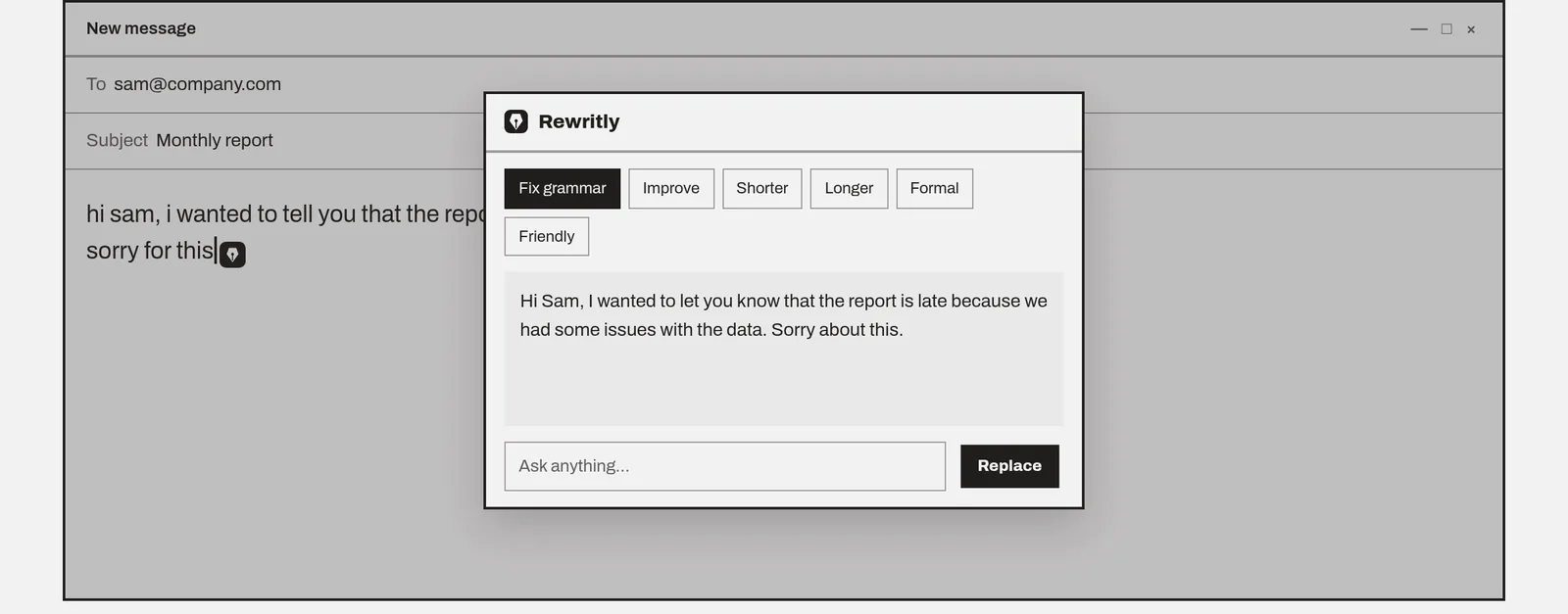
Grammarly underlines mistakes as you type. If you'd rather write the message first and then fix or rewrite all of it, Rewritly works in almost any app on Mac and Windows, including the Discord desktop app:
- Type your message in Discord.
- Click the Rewritly icon next to your cursor, or press the shortcut.
- Pick Fix grammar, Friendly, Formal or Shorter, or ask for something such as "make this sound less rude".
- Press Replace, then send.
Here's an example, written for this guide, using Fix grammar:
- Before: "hey guys i cant join the raid tonite, my internet is not working since morning, sry"
- After: "Hey guys, I can't join the raid tonight. My internet hasn't been working since this morning. Sorry!"
There's a side-by-side in Rewritly vs Grammarly.
Try Rewritly in Discord
The free plan gives you 10 rewrites a day, and no card is needed.
Free plan, no card needed · macOS 11+ · Windows 10/11 · On a phone? Email yourself the link
Sources (checked 15 Nov 2026): Grammarly support: Grammarly with other apps (Slack, Skype, Apple Mail, Discord, etc.) · Grammarly desktop · Discord Support: Spellcheck in Discord · Discord feedback: Grammar checker in chat window
FAQ
Does Grammarly work on Discord?
Yes, through Grammarly's desktop app. Grammarly's support article on other apps names Discord and says to install Grammarly for Windows or Grammarly for Mac to access it in most native apps.
Is there a Grammarly Discord bot or plugin?
Grammarly's support page we checked doesn't mention a Discord bot or plugin. It points to the desktop app. Bots that use Grammarly's name on bot-listing sites are made by other people, so check what a bot can read before you add it to a server.
Does the Grammarly browser extension work in the Discord app?
No. A browser extension only runs inside your browser. It can help when you use Discord in a browser, but for the Discord desktop app you need Grammarly for Windows or Mac.
Does Discord have spell check?
Yes, on Windows 10 and later and on macOS. Discord says its spellchecker uses your computer's own spell checker. Right-click in a chat window and tick Spellcheck to turn it on.
Why does Discord underline words that are spelled right?
Discord says spell check is based on the language of your system and of Discord. If they're different, correct words can be flagged. Match the languages, or right-click the word and choose Add to Dictionary.
Does Discord check grammar?
Discord's help describes a spellchecker, not a grammar checker, and users have asked for one in Discord's feedback forum. For grammar and tone, use Grammarly's desktop app or another writing assistant.
Is Grammarly free in Discord?
Grammarly Free includes spelling, grammar and tone detection. Full-sentence rewrites are listed under Pro.