Full disclosure: Rewritly is our product. The steps below come from Microsoft's support pages and its Teams support team's answers, checked on November 15, 2026. Menus can differ between Teams versions.
1. Turn spell check back on in Teams
- Select Settings and more (the three dots next to your profile picture), then Settings.
- In the General section, go to Editor Spellcheck and make sure spell check is turned on.
- Quit Teams completely and open it again.
Check it even if you don't remember turning it off.
2. Check your spellcheck languages
Teams only checks the languages on your spellcheck list. In Settings, then General, go to Editor Spellcheck and select Manage. You can also do this while writing: select More options, then Manage languages.
Two limits from Microsoft are worth knowing:
- You can add up to 5 languages.
- Multi-language proofing currently supports English, Spanish, French, Italian and German. If you write in another language, Teams may not underline mistakes at all.
3. On Windows: install Basic typing and turn on highlighting
Microsoft's support team points to two Windows settings that Teams relies on:
- Open Settings, then Time & language, then Language & region. Select the three dots next to your language, then Language options, and make sure Basic typing is installed. Restart your PC if you install it.
- Go to Settings, then Time & language, then Typing, and turn on Autocorrect misspelled words and Highlight misspelled words.
4. Update Teams
In Teams, select Settings and more, then Settings, then About Teams to check your version and get the latest update. Then restart Teams.
5. Try Teams on the web
Sign in at teams.microsoft.com in your browser and type a clear mistake, such as "recieve".
- It's underlined on the web: your account is fine, and the problem is the desktop app. Go to fix 6.
- It isn't underlined on the web either: check that your browser's own spell check is on. In Chrome, open Settings, then Languages, and turn on Spell check.
6. Reset Teams or clear its cache
Microsoft describes clearing the cache as a targeted fix for problems with the app on your computer, not a first step. It also says not to clear it for missing messages or chat history problems, because it deletes logs needed to find the cause.
- Windows (new Teams): open Settings, then Apps, then Installed apps, and search for Microsoft Teams. Select More options (...), then Advanced options, then Reset. Microsoft notes this deletes the app's data, including your personalization settings.
- Mac: quit Teams first. Microsoft's article on clearing the Teams client cache gives the steps for Mac. Ask your IT team if you're not comfortable running Terminal commands.
Restart Teams afterwards. The first start can take longer while Teams rebuilds its files.
7. Ask your IT team
On a work or school account, your organization can control how Teams works. If none of the fixes above help, ask your IT team whether a policy or an update is affecting spell check.
Correct words underlined?
If Teams flags a word that's spelled right, such as a name or product term:
- To stop it flagging the word again: select it, then select Add to Dictionary.
- To skip the suggestion: select the word, then select Ignore All.
In the spellcheck settings you can also ignore uppercase words, words with numbers, and web and file addresses.
Spell check won't fix grammar
Even when it works, spell check only catches misspelled words. It won't catch "the report have been send to the client", an update that's twice as long as it needs to be, or a reply that sounds sharper than you meant. Microsoft's help covers spell check in Teams, not grammar. See how to add grammar check to Teams for the options.
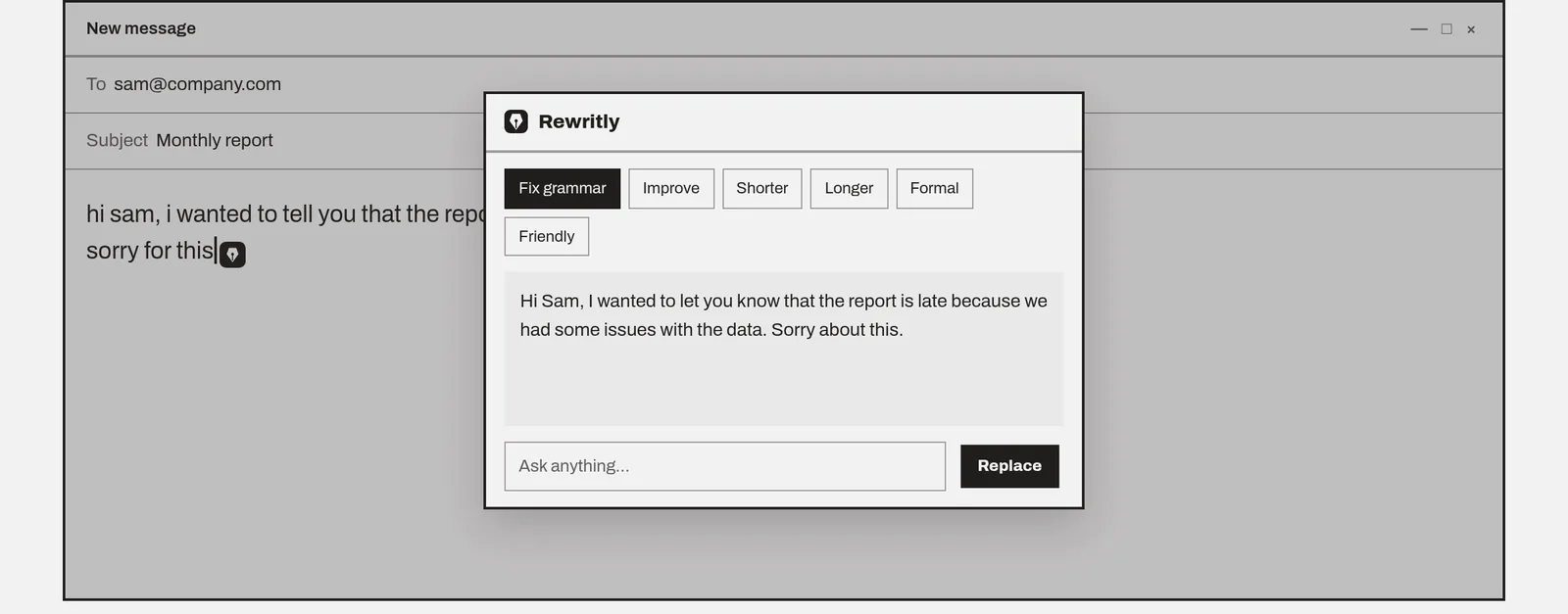
Rewritly works in the Teams message box on Mac and Windows:
- Type your message in Teams.
- Click the icon next to your cursor, or press the shortcut.
- Pick Fix grammar, Friendly, Formal or Shorter, or ask for something such as "make this polite but firm".
- Press Replace, then send.
Here's an example, written for this guide, using Fix grammar:
- Before: "hi all, the report have been send to client yesterday, pls let me know if their is any feedback"
- After: "Hi all, the report was sent to the client yesterday. Please let me know if there's any feedback."
Check your company's policy before using any third-party writing tool for work messages.
Fix grammar in Teams, not just spelling
The free plan gives you 10 rewrites a day, and no card is needed.
Free plan, no card needed · macOS 11+ · Windows 10/11 · On a phone? Email yourself the link
Sources (checked 15 Nov 2026): Microsoft Support: Check your spelling in multiple languages in Teams · Microsoft Learn: Clear the Teams client cache · Microsoft Q&A: My spellcheck is not working in Teams
FAQ
Why is spell check not working in Teams?
Usually because spell check is off in Teams' settings, the language you're typing isn't one of your spellcheck languages, or Windows is missing its Basic typing feature. An outdated Teams app or a damaged cache can also stop it, and some work accounts have policies set by IT.
How do I turn on spell check in Teams?
Select Settings and more next to your profile picture, then Settings. In the General section, go to Editor Spellcheck and turn it on, then restart Teams. The exact wording can differ between Teams versions.
Why doesn't Teams check spelling in my language?
Microsoft says Teams' multi-language proofing currently supports English, Spanish, French, Italian and German, and you can add up to 5 languages. Add yours under Editor Spellcheck, then Manage. Words in other languages may not be checked.
Does Teams have autocorrect?
On Windows, Microsoft's support team suggests turning on Autocorrect misspelled words and Highlight misspelled words under Settings, Time & language, Typing, if spell check isn't working in Teams.
How do I stop Teams flagging a word that's spelled right?
Select the word, then select Add to Dictionary. To skip a suggestion without adding the word, select Ignore All.
Will resetting Teams delete my settings?
Microsoft says resetting the new Teams app on Windows deletes the app data, including personalization settings you configured. Try the quicker fixes first.
Does Teams check grammar?
Teams checks spelling, not grammar or tone. For those, use a writing assistant that works in the Teams message box, such as Rewritly on Mac and Windows.